Pool and spa control, connected to the rest of your home.
Adjust supported pool functions alongside outdoor music and lighting. Keep equipment operation with the pool system, and understand the limits of your Control4 connection.

Find the part you need
One system, two clear responsibilities
The pool controller manages the equipment at the pool. Control4 adds a convenient interface and supported connections to the rest of the home. Think of a scene as a request to the pool system—not permission to bypass its operating rules.
The pool equipment layer
Pumps, valves, heaters and any installed treatment equipment need their own correctly configured controls and protections. Which functions exist depends on the actual equipment, not the Control4 screen.
The whole-home layer
Supported pool controls can sit alongside music and lighting. You might request spa warm-up from inside, then choose the patio playlist when you go outdoors.
Current integration starting points
The public Control4 pool-driver catalog, checked October 19, 2026, lists these examples. A listing is a starting point, not confirmation that your installation supports every function.
- Pentair IntelliCenterIntelliCenter Control System driver · developer: Control4
- Jandy iAquaLink IQ900IQ900 driver listing · developer: Control4
- Hayward OmniLogicOmniLogic driver · developer: Control4
- Fluidra ConnectMyPoolConnectMyPool driver · developer: Fluidra Australia
All four entries list IP communication. IP does not, by itself, tell you whether a connection is local or cloud-dependent. These entries are not marked certified in that catalog; they are not presented here as certified integrations or a complete compatibility list.
Check the exact chain, not only the logo
A Pentair, Jandy or Hayward label alone is not enough. Start with the model on the automation panel—not just the pump or heater. A driver for one controller family does not establish support for another family from the same brand.
Before buying equipment or approving work, ask for these points in the proposed scope:
- Your hardware: controller model, firmware and any required network module.
- The connection: driver name, developer and version, plus supported Control4 software.
- The experience: the commands available, which states report back, and any noticeable update delays.
- Service dependencies: local or cloud operation, account access, recurring charges and who supports each part.
If you already have a reliable controller, check the connection first. Replacement should solve a documented limitation, not follow automatically from adding Control4.
What you should see on the screen
Control4’s user guide illustrates water and air readings, a target temperature, and available pump or heating modes. The same guide makes clear that features depend on the installed pool or spa system. Screen layout can also differ by software version.
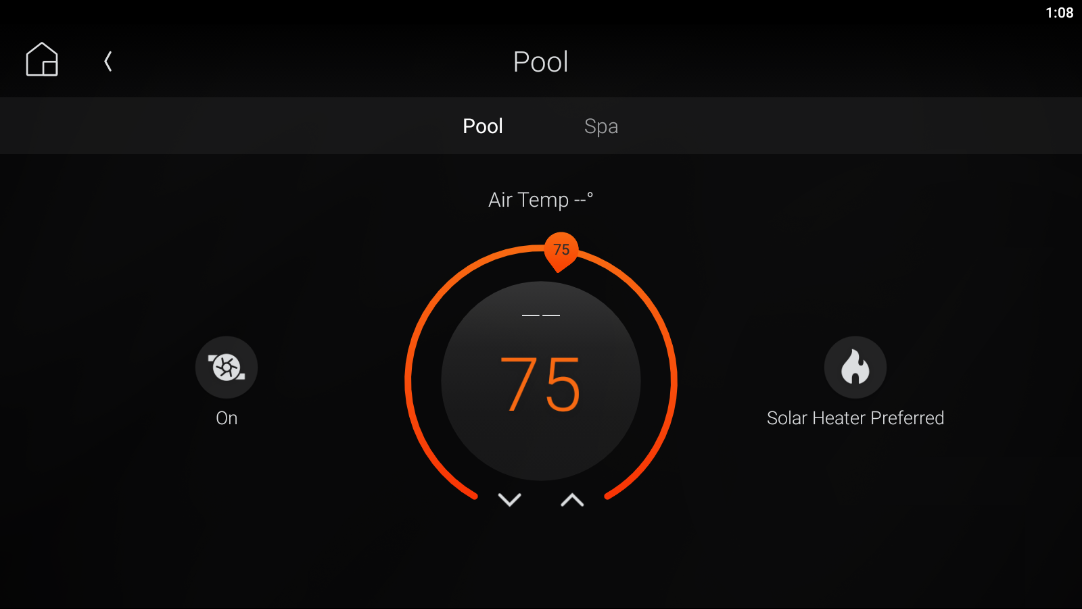
For your home, confirm which controls actually appear: pool/spa selection, temperature requests, jets, lights or water features. Color selection, equipment faults and “ready” notifications need separate verification; do not assume that every driver exposes them.
During handover, compare commands and reported status with the native controller. A requested setting is not proof that the equipment has reached that state. Missing or delayed feedback should be explained, not disguised as a live reading.
What “Spa Ready” really means
A warm-up button should be named for what it does. “Start spa warm-up” is clearer than “Spa Ready” if it only sends a mode and temperature request.
- Request warm-up. The supported integration sends the chosen mode or target to the pool controller.
- Let the pool system operate. Its configured equipment controls handle the required sequence. This is not a universal valve, pump or heater programming recipe.
- Check the result. If reliable feedback is available, the interface may show progress or support a notification. Otherwise, confirm at the native controls.
Heat-up time varies with water volume, starting temperature, weather and heater capacity. There is no single dependable warm-up time for every spa. A target reached notification does not mean the water is safe to enter: temperature suitability, water condition and supervision still need attention.
Scenes that make sense
Start with two useful scenes, rather than a screen full of overlapping buttons. These are planning examples; pool functions must be confirmed for your equipment.
Evening outside
Choose supported pool lighting, patio lighting and outdoor music together. Add a water feature only when its operation has been approved for that scene.
Goodnight outside
Stop music and turn off nonessential entertainment lighting. Do not use a generic “all off” command to stop required circulation or override pool protection.
Keep automatic pool-cover movement out of a general entertainment scene. Cover operation, service mode and winter shutdown need the pool professional’s equipment-specific procedure—not an unattended whole-home shortcut.
Convenience is not a pool-safety system
Control4 is not a substitute for active adult supervision, suitable barriers or required independent safety devices. The CPSC Pool Safely guidance also warns against swimming when a drain cover is loose, broken or missing.
Have qualified pool professionals and an electrician address equipment protections, electrical safety and applicable local requirements. Water testing and treatment remain part of pool care; an app status is not a water-quality assessment.
Everyone responsible for the pool should know the local controls, emergency procedure and service contact. Do not make an emergency response depend on a phone, internet connection or automation scene.
Outages and Chicago-area winterization
Confirm what continues if Control4, Wi-Fi, internet access or a cloud service is unavailable. These are different failure conditions. A local equipment controller may retain its own functions, but that does not mean it can run pumps or heaters during a power outage.
Freeze protection also has limits. For example, Pentair’s IntelliCenter manual describes enabling it and assigning protected circuits; it is not proof that every attached device is automatically covered. Do not change those settings from a general guide.
For a Chicago-area seasonal pool, agree on closing and winterization with your pool professional. Automation is not a substitute for professional winterization or a plan for power loss. Keep winterized or serviced equipment from being restarted by an everyday scene.
A short plan before installation
- Photograph the panel label and equipment pad. Include the controller model and the controls you already use.
- Check the network at the equipment. Confirm a supported wired connection or dependable outdoor Wi-Fi, with accessible service equipment.
- Coordinate the trades. Denali Tech can plan the Control4 experience; your pool contractor and electrician handle the pool equipment and their respective installation responsibilities.
- Agree on a handover. Demonstrate supported functions, feedback delays, outage behavior and how to use the native controls. Document who to call for each type of fault.
The best starting point is often modest: keep the equipment that works, connect the functions you actually use, and leave a clear path for service.
Want your pool controls to fit the rest of your home?
Send the pool-controller model, a panel photo and the functions you want to use. We’ll help establish what can connect before you commit to new equipment.
Plan my pool connectionOfficial references and image sources
Checked October 19, 2026. Manufacturer examples are not a compatibility guarantee. Product names belong to their respective owners.
Related planning guides
Explore whole-home control · Understand Control4 Connect and remote-access services